Build a chat feature using Pusher Channels in Swift
Developing a chat feature brings different difficulties to deal with. Client’s communication with backend can be one of them. We experienced a vital problem with this while using Pusher API. Therefore, I wanted to share our experience to help those who will use Pusher in their iOS apps.
We have reviewed many solutions to develop a chat feature in the MathHero app which has more users day by day and an increasing need for communication between its users. There are various solutions for developing a chat feature. Among them, we needed to find out the most appropriate one for us considering development cost, time constraints, sustainability of development, and other product-related concerns. We considered Pusher as one of the solutions that we could apply.
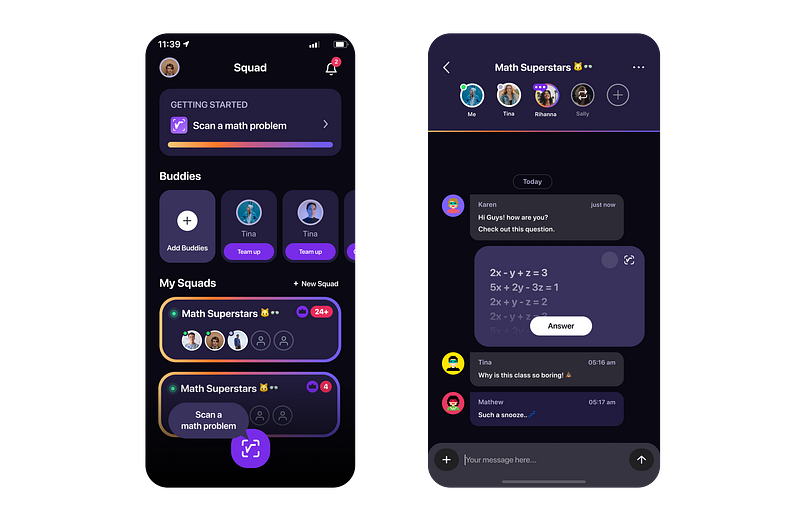
We had two options at the beginning; the first one is handling real-time messaging by using the socket in our servers which is expensive in terms of development, sustainability, and so on. The second one is using a third-party, dependable service that let us focus only on feature development.
The best solution is the one that meets your needs under reasonable circumstances.
When we considered our needs, development cost, time constraints, and the service feature, our needs and the scope of Pusher matched. We also wanted to test our feature in a short time. Therefore, we chose Pusher for our development.
Pusher is a real-time messaging service developed for web and mobile apps. The API takes place between the client and server and maintains the connection for the channels you are subscribed to.
It is easy to send your first message by using Pusher API. It is also easy to set up the API and manage the events. However, some challenging issues matter in terms of authorization. You can break the connection limit and cause problems there.
There are different types of channels. Presence channels, private channels, and so on. We needed to use private and presence channels which require authentication. Handling authentication is a very vital issue for proper development and it is the main reason for writing this article.
| [Pusher Channels Docs | How to build presence channels](https://pusher.com/docs/channels/using_channels/presence-channels/) |
It is easy to set up and make your first conversation with Pusher. Getting started document is very useful. You can subscribe to channels, listen to events, and send events. For a more detailed setup guide, you are redirected Github page. We implemented the API as guided in the documentation.
However, we started to see some connection issues in course of time. We worked on it with Furkan Köse and noticed that the requests consumes our server’s traffic limit and the server cannot respond after that. As Furkan Köse said:
Since the API needs to scale to respond to so many concurrent authentication requests, we need to establish more database connections to be able to scale up the API and run our database queries. Therefore, after a short period, the maximum connection limits of the database becomes reached because we need to have more instances to deal with all those concurrent authentication requests that are sent at a time.
Since we use private channels, we need authorization. However, when we set up the API as guided, we saw that it makes auth requests for each channel one by one. If you allow multiple channels, probably you will, Pusher API does not request all your channels’ authorization at once but one by one which means that your backend needs to respond authorization request of each channel that a user has. This is a catastrophic problem for the backend side.
When you follow the setup guidelines in the documentation in Github, you need to define an auth method for the auth required channels, AuthMethod. For instance, you are supposed to set up them as follows;

Then, your class conforms to AuthRequestBuilderProtocol which makes the authorization for each channel.
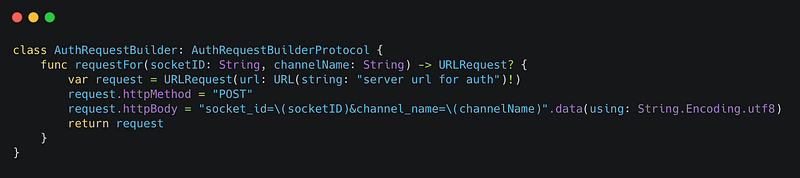
If you follow this way as suggested in the documentation, you will have a huge traffic in your backend for authorization of many many channels and you will face issues. However, we developed with Furkan Köse a useful method that makes the auth at once and connects the channels. Here is how;
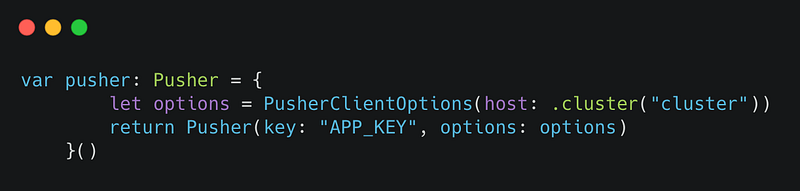
Firstly, define pusher as if it is not an authorization-required channel:
Secondly, make one auth request to the backend with an array of all private channels that you would like to connect to.
Thirdly, use that info when you subscribe to each channel. For some reason, we do not need channel data in private channels but we need it in presence channels. So we make the connection as follows;

By doing it in this way, you save your backend from tons of connection requests and your servers work as expected.
To learn more about our development experiences, you can have look at our medium page. At Plus Minus One, we love to learn and share our experiences. We hope this article makes your life easier 🙏🏻
| [Musa Kökçen — Turkey | Professional Profile | LinkedIn](https://www.linkedin.com/in/musakokcen/) |